ROLE
UX UI Designer
Duration
3 Week
Introduction
During the pandemic, I designed BeTo, an application created to facilitate residential building access control.
At the time, the goal was to quickly address a health-related need, and my design focus was entirely on the building administrator’s perspective.
Two and a half years later, I decided to revisit the project with a single question in mind:
The result was a reimagined version from scratch, built upon a stronger architecture, coherent user flows, and a more inclusive experience that now supports different user roles.
Context and Challenge
The original version of BeTo was limited to displaying access requests and approving or rejecting them.
Although functional, the design suffered from readability, hierarchy, and structural issues, and lacked features that would allow it to scale.
The challenge was to transform a static tool into a modular residential management system, one that could scale across multiple buildings, adapt to different user roles, and provide clarity both visually and functionally.
Redesign Process
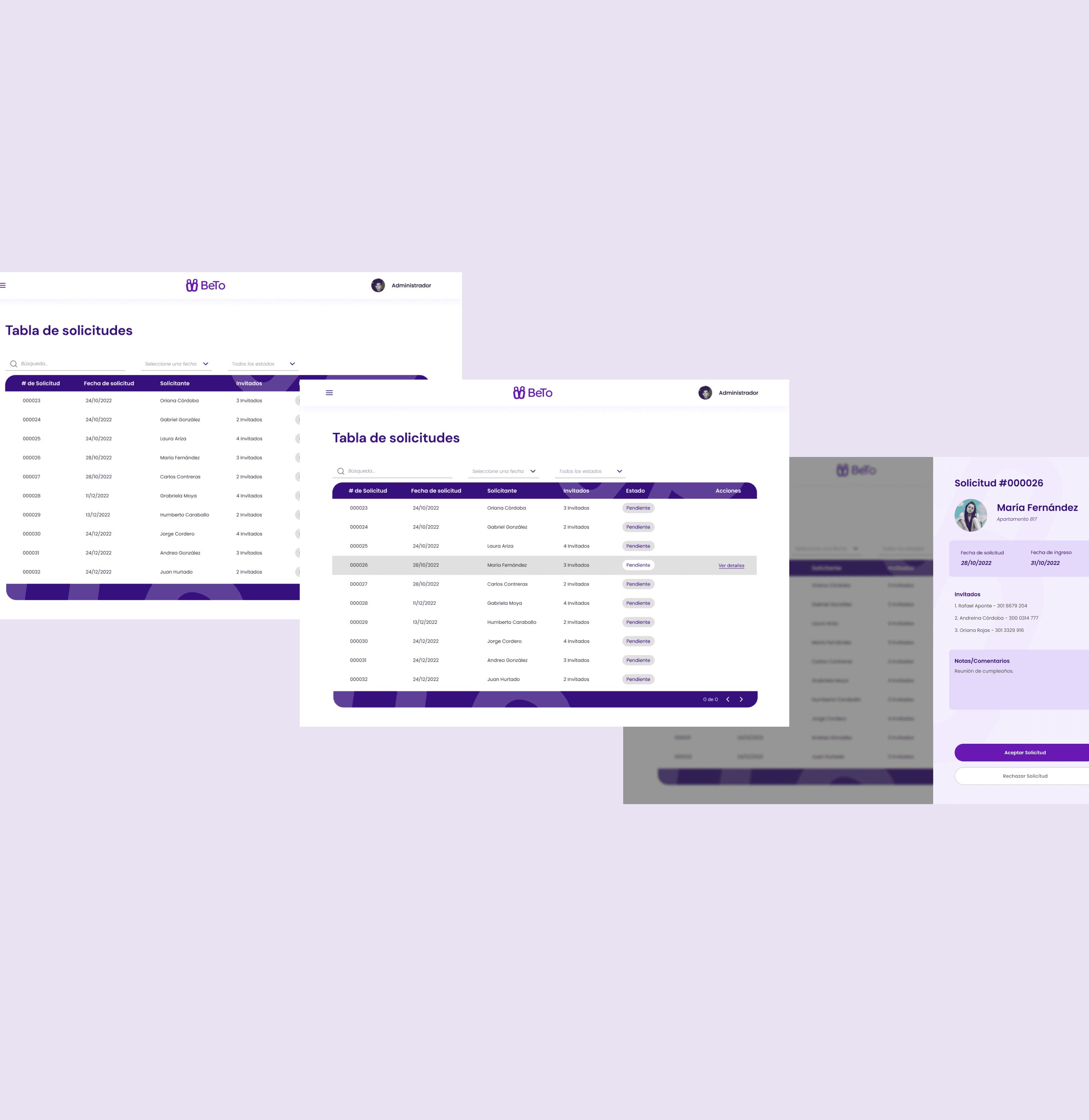
Before starting the redesign, I conducted a UX audit of the previous product to identify areas for improvement. That exercise revealed several key insights that guided the new design.
UX Audit (Before)
General Observations
Inputs had low contrast, making them difficult to see and reducing usability.
Links were inconsistent, some didn’t look clickable, and others used different visual styles.
The overall design lacked maturity and visual hierarchy, giving the interface an unfinished or outdated appearance.
There was no way to invite people to join a building space, which limited its potential as a SaaS product for multiple residential complexes.
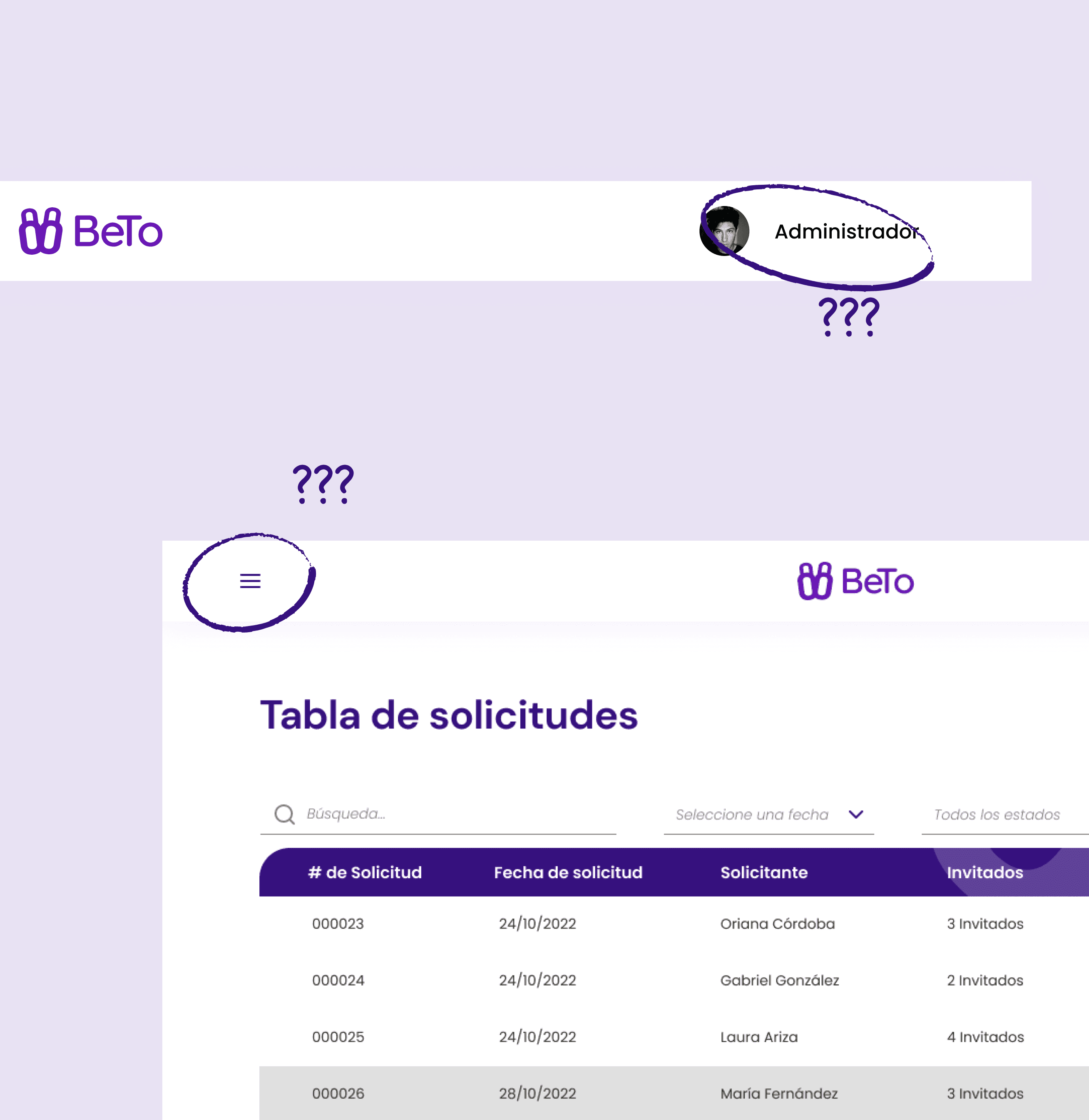
Top Navigation Bar
The navigation felt confusing: a hamburger menu with no function, a centered logo that didn’t add value, and a user section showing only the role (not the name or actions).
💡 Opportunity: Redefine navigation according to space hierarchy (residential complexes) and user roles.
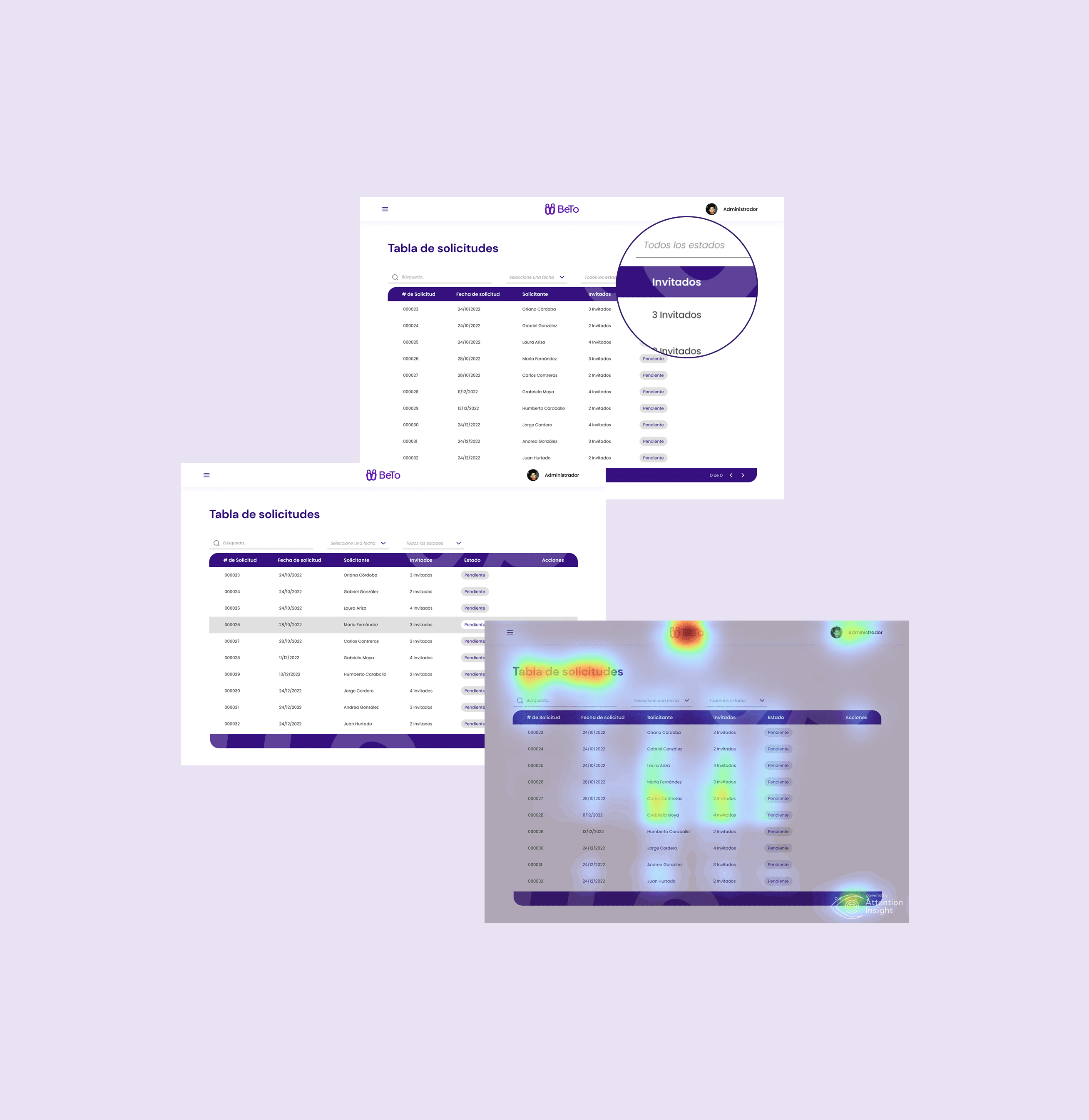
Requests Table
Decorative graphics without functional purpose that distracted the user.
Lack of visual separation between rows and columns, making it hard to read.
Inconsistent and abrupt hover states.
Poor differentiation between key data points.
💡 Opportunity: Create a cleaner table using color and visual hierarchy to support faster decision-making.
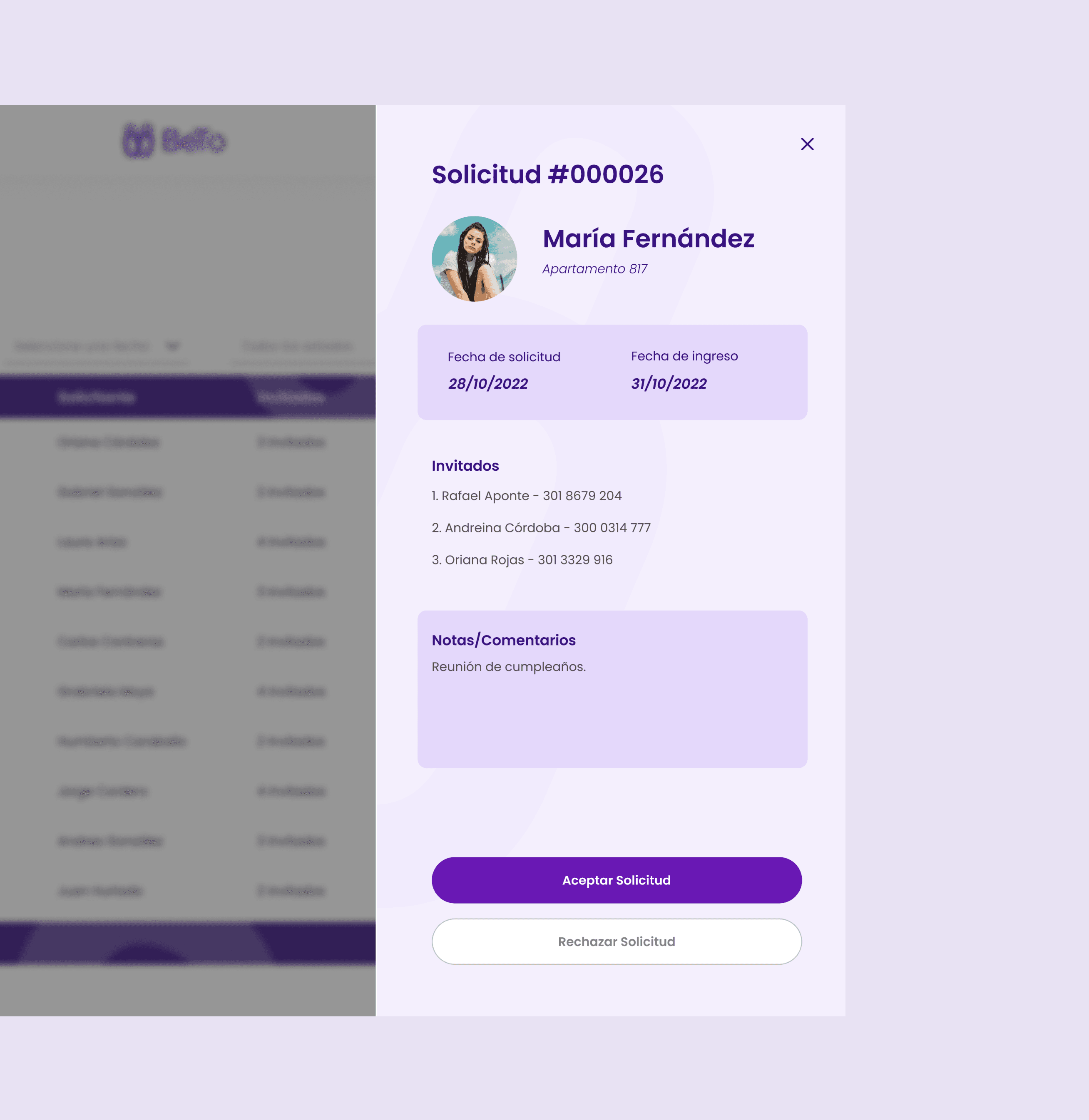
Request Detail View
Although visually appealing, elements were poorly aligned, and hierarchy didn’t match information importance.
It was unclear what was informational versus interactive.
💡 Opportunity: Redefine the information architecture so the most relevant data are perceived first.
Evolution (After)
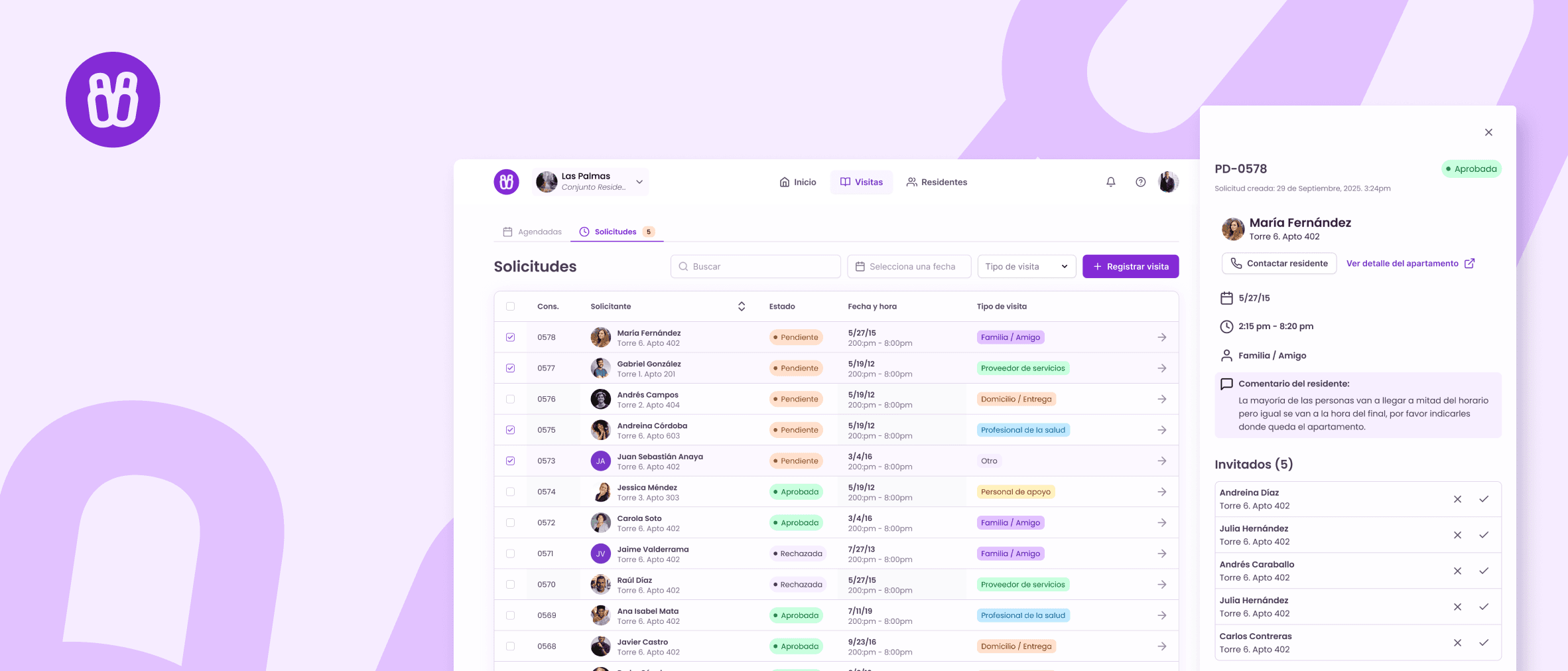
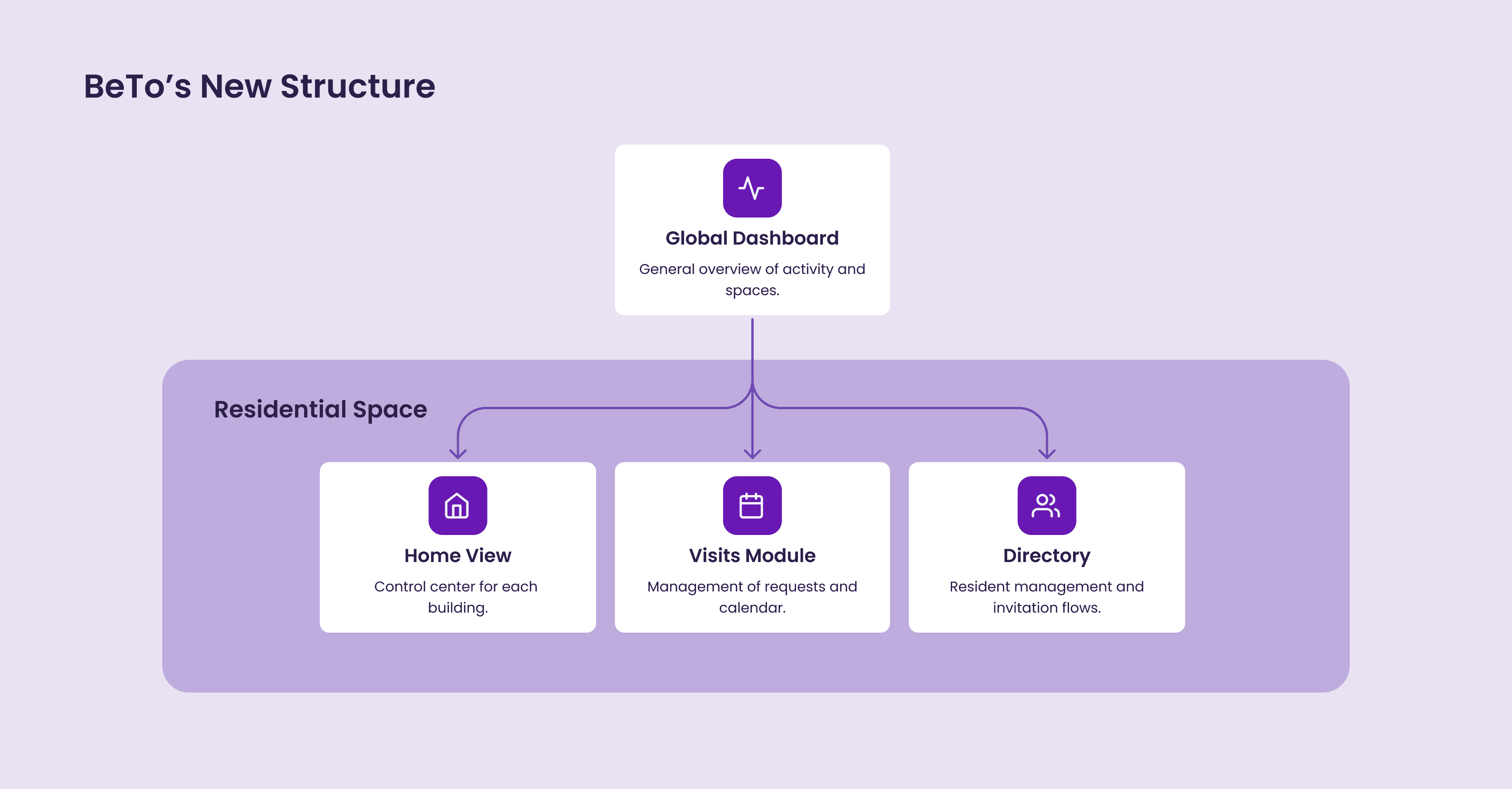
After the audit, I redefined the system structure around four main modules, designed for scalability and consistent interaction patterns across roles.
Each one was introduced to solve a specific product gap or user pain point and included a clear Design Intent to align the experience with real needs.
Global Dashboard
🔍 Identified need:
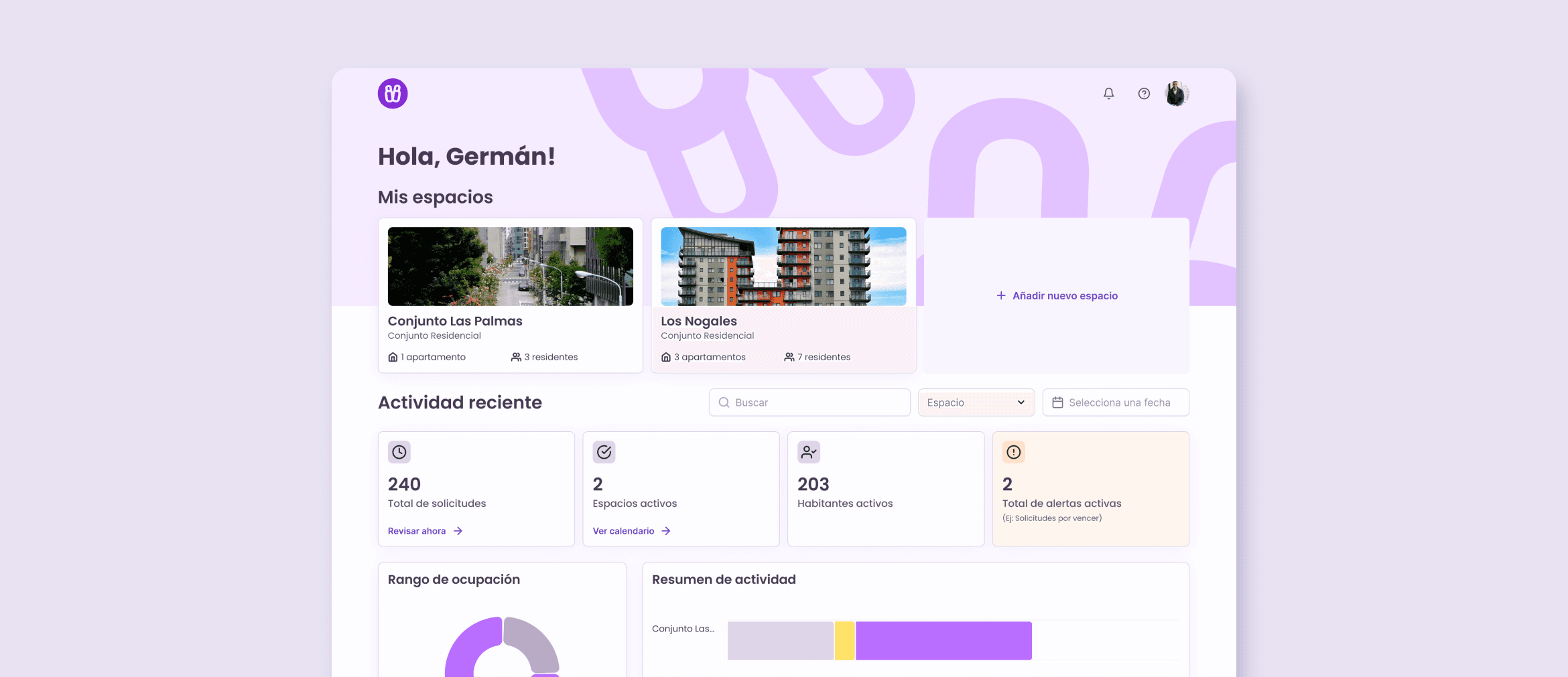
In the previous version, users could only access one building at a time, with no overview of all the spaces they belonged to. For users managing or belonging to multiple residential complexes, this made navigation fragmented and confusing.
✅ Design Intent:
To provide users with a centralized entry point where they can see all the residential complexes (spaces) they are associated with, regardless of their role. This helps unify multi-space management under one coherent experience.
✨ Key Features:
Cards representing each space with name, address, and quick stats (e.g., number of residents).
Recent activity log summarizing latest actions across spaces.
Search and filter options for users with access to multiple residences.
Option to add or join a new space (future release).
Residential Home View
🔍 Identified need:
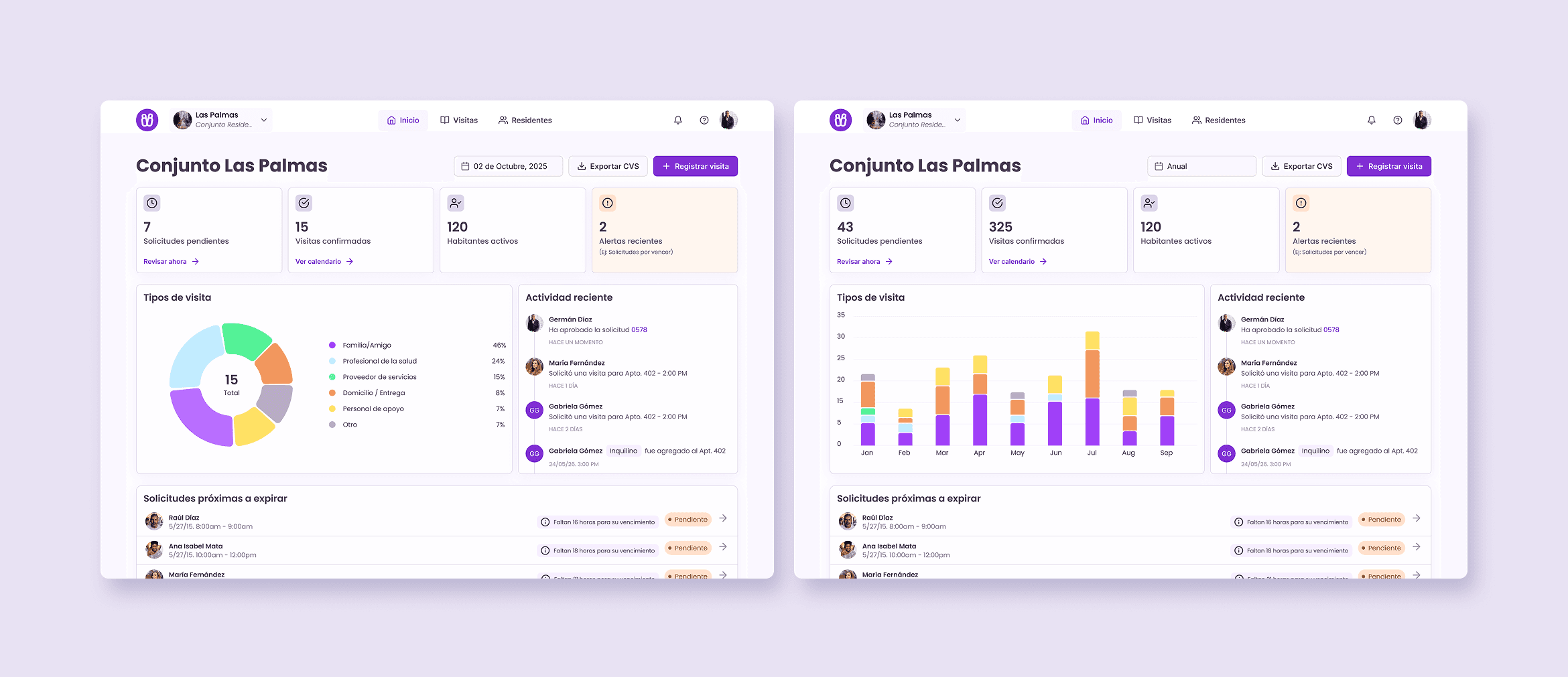
The original app dropped users directly into a table of visit requests, offering no context about what was happening in the building. There was no way to quickly assess the state of operations or monitor recent activity.
✅ Design Intent:
To serve as the operational hub for each individual residential complex, offering an at-a-glance summary of activity and access to key modules.
✨ Key Features:
Info cards: Confirmed visits, pending approvals, active residents, upcoming expirations.
Recent activities panel with chronological events.
Visits of the day table with quick overview and inline actions.
Quick actions: Register new visit, export to CSV.
Dynamic category chart that adjusts by selected date range (day, week, month).
Visits Module
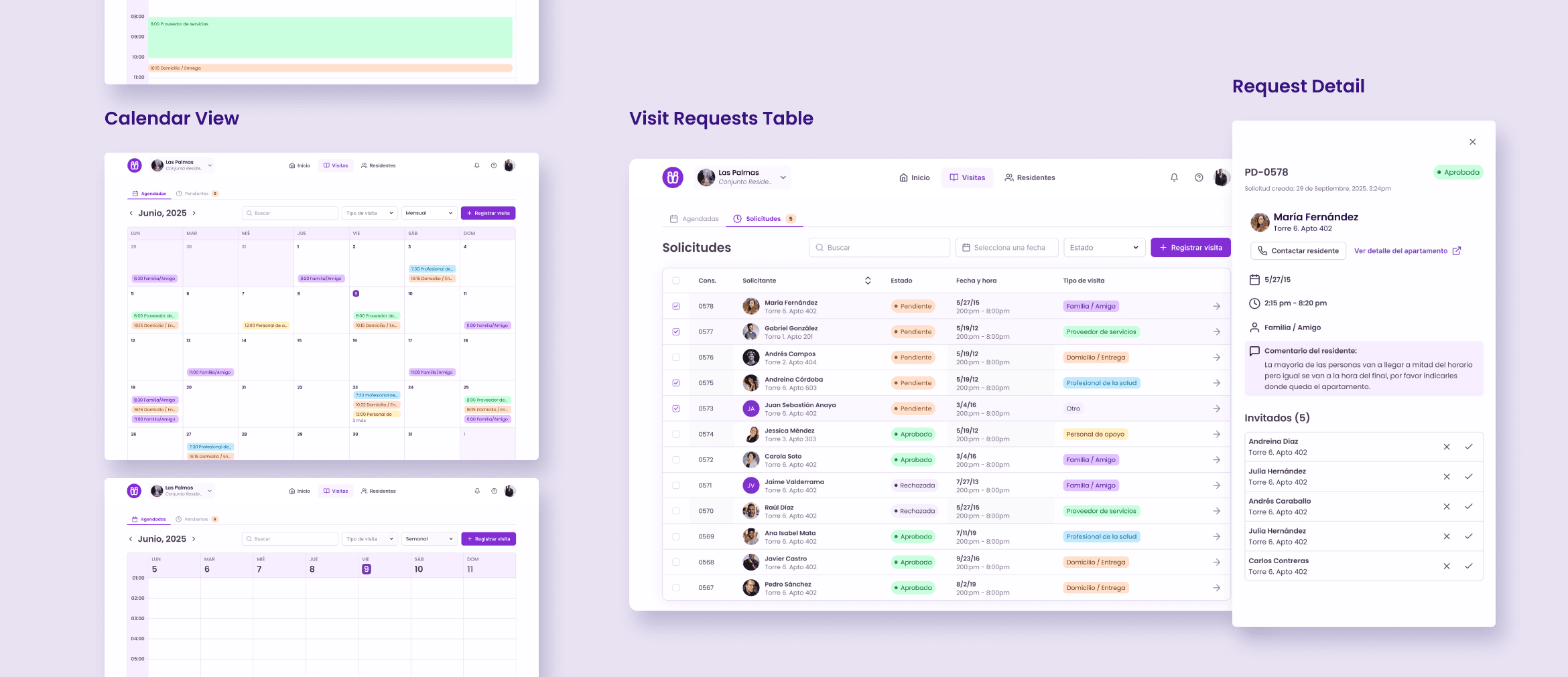
🔍 Identified need:
The original table design lacked readability. The visual hierarchy made it difficult to distinguish between data points, and filters were not easily discoverable. As a result, users struggled to quickly scan, sort, or interpret visit information.
Additionally, there was no way to visualize visit patterns over time, making it hard to anticipate peak days or identify unapproved requests before expiration.
✅ Design Intent:
The redesign focused on improving legibility, emphasizing filters, and adding a calendar view to provide temporal context and enhance situational awareness.
✨ Key Features:
Requests Table View
Improved readability with defined spacing and contrast.
Quick filters (Approved, Pending, Expired).
Search bar and inline approval/rejection actions.
Color-coded status indicators.
Activity Calendar View
New tab system to switch between table and calendar.
Visualizes visit activity by day, week, or month.
Each visit represented by a color-coded card.
Extended context (visitor info, unit, duration).
Resident Directory
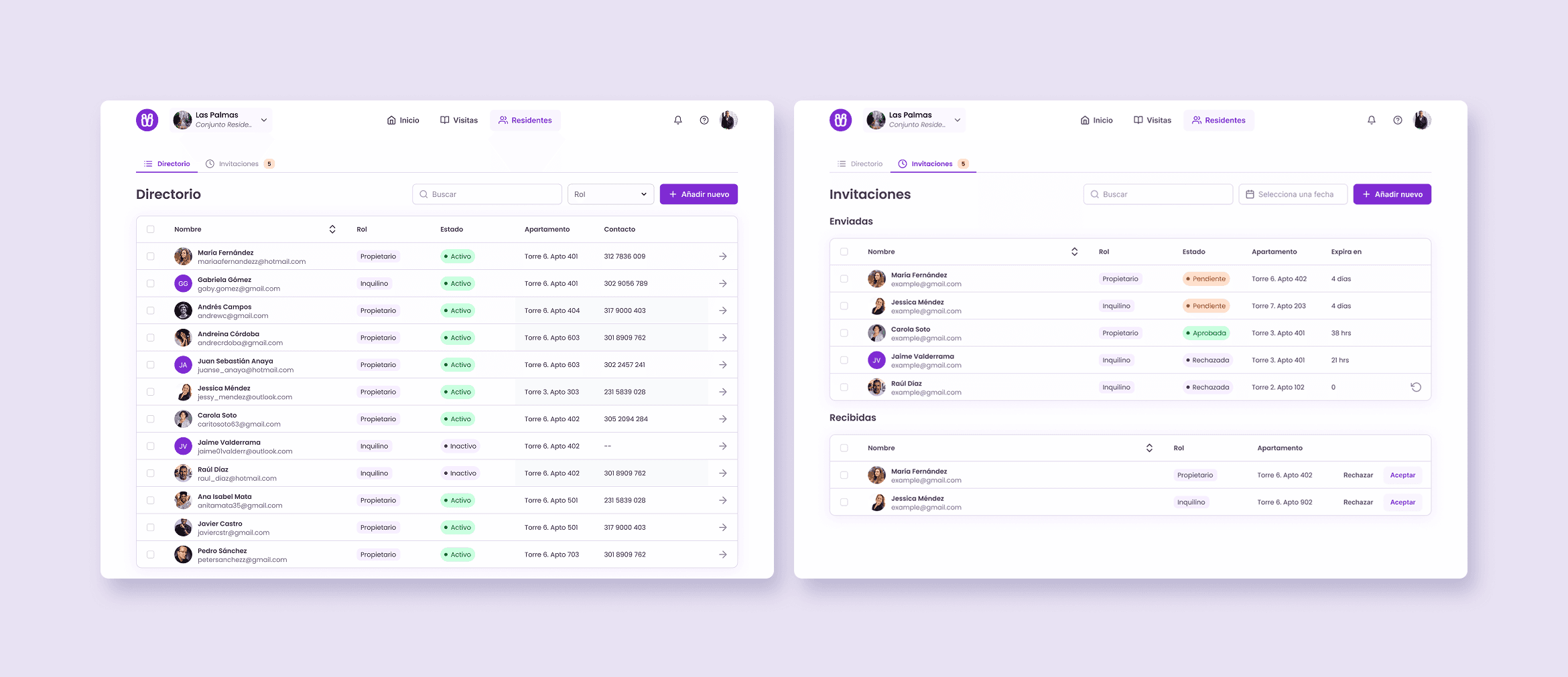
🔍 Identified need:
In the old version, there was no user management or differentiation between residents. This made it impossible to know who lived in each unit or to control who had access to administrative actions.
✅ Design Intent:
To centralize user management within each space, differentiating between owners and tenants, and facilitating role-based invitations.
✨ Key Features:
Clear visual separation between resident types.
Quick filters and editable roles.
Invitation flow: admins send invites, residents confirm to join.
Scalable structure for future role additions.
Reasoning Framework: How the New System Took Shape
Although this project didn’t involve formal user research, many of the redesign decisions emerged through situational reasoning, reflecting on real-world patterns and the operational dynamics of residential living.
Instead of testing hypotheses, I focused on observing possible use cases and asking critical “what if” questions that exposed functional gaps in the previous version. These reflections evolved gradually throughout the redesign process and became the foundation for the system’s new architecture.
Key Questions That Drove the Redesign
What happens when a building administrator manages multiple residential complexes?
How do property owners track activity if they rent out several apartments?
What if a tenant changes but the owner remains the same?
How can residents or guards anticipate upcoming visits rather than just react to requests?
What would a scalable user management system look like for a product that could operate as SaaS?
By mapping these questions, I started identifying behavioral and structural patterns that the old version could not support. Each question revealed a potential use case which, in turn, translated into a concrete design opportunity.
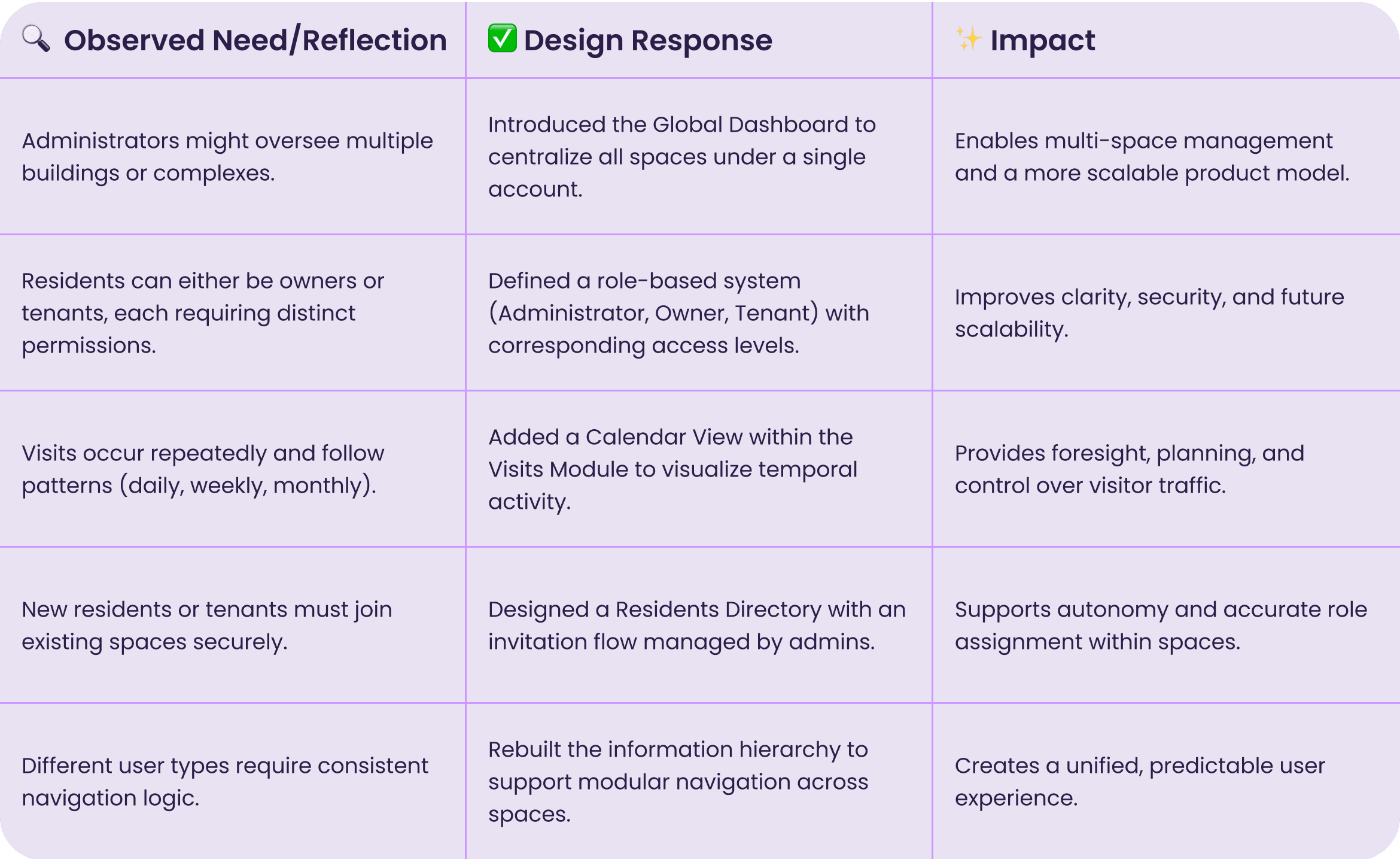
Defining Roles and Permissions
While refining the system architecture, I realized that the original version of BeTo treated all users as if they shared the same level of access and responsibilities. This created unnecessary complexity for some and limited control for others.
To make the product scalable and flexible across multiple buildings and user types, I introduced a role-based permission model.
Thought Process:
Identify user types: Administrator, Owner, and Tenant.
Map access needs: Each role interacts with different modules and requires specific visibility.
Define permission tiers: Actions like “Approve visit,” “Invite resident,” or “View reports” were distributed according to responsibility level.
Design for clarity: Interfaces dynamically adapt to the user’s role, showing only relevant modules and actions.
This approach not only improved usability but also laid the foundation for a multi-tenant SaaS model, where a single account could manage multiple residential complexes under distinct permission sets.
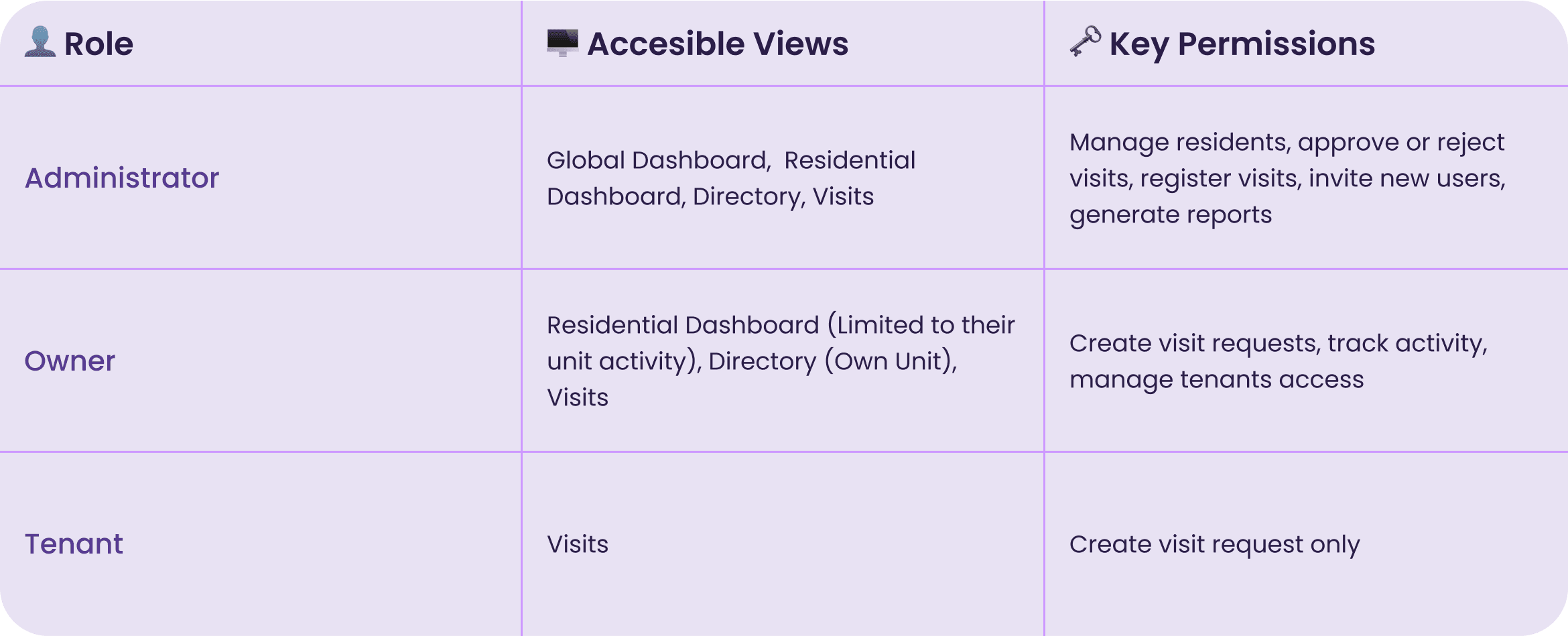
Reflection
Revisiting BeTo allowed me to approach design as a system rather than a set of isolated screens. What once was a static, single-purpose tool evolved into a coherent ecosystem that adapts to different contexts and roles.
The redesign not only improved clarity and usability, it helped redefine how information, people, and permissions connect within the same space. More than refining visuals, it was about giving structure and logic to an idea that had potential but lacked maturity.
UX UI Design
Zlow App- Slow Fashion Community App
Check the project
User Experience
RyanAir’s Search Engine Redesign
Check the project
I’d love to hear from you.